
Get Data from Cloud
The get API allows a user to copy data from a cloud-based storage (e.g., Amazon S3, and Microsoft Azure BLOB)
to a specified Galaxy history.
You may use the following steps to use this API:
-
Login to Galaxy using your Google account (read how);
-
Define a cloud authzorization configuration (read how);
-
Get a Galaxy API key by going to
User -> Manage API keyOn Galaxy’s webpage and clicking on theCreate a new keybutton; -
Make the API call as it follows:
4.1. Open Postman;
4.2. Choose
POSTand enter the following in the fields highlighted in the following figure:http://127.0.0.1:8080/api/cloud/storage/get?key=1234567890Replace
http://127.0.0.1:8080with the IP address of the Galaxy instance you’re using, and replace1234567890with the your API key.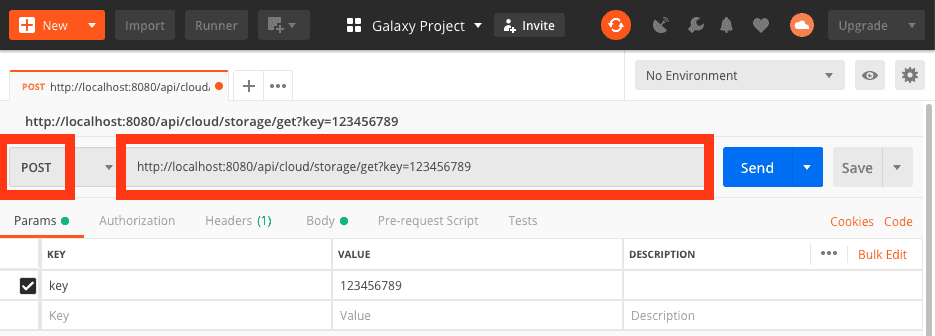
4.3. Get the ID of Galaxy
historyto which you want to copy data, by going to the following address on your browser:http://127.0.0.1:8080/api/historiesThis will display a JSON object similar to the following, note the value of
idfield:[ { "name":"Unnamed history", "tags":[ ], "deleted": false, "purged": false, "annotation": null, "url": "/api/histories/df7a1f0c02a5b08e", "published": false, "model_class": "History", "id": "df7a1f0c02a5b08e" } ]4.4. Get the ID of authorization defined in step #2, which you want to use to read the cloud-based storage, by going to following address:
http://127.0.0.1:8080/api/cloud/authzThis will display a JSON object similar to the following, note the value of
idfield:[ { "authn_id": "f2db41e1fa331b3e", "user_id": "f2db41e1fa331b3e", "last_update": "2018-12-07 17:53:55.714802", "last_activity": "2018-12-07 17:53:55.714818", "provider": "aws", "model_class": "CloudAuthz", "config": "{u'role_arn': u'arn:aws:iam:: ...'}", "id": "f2db41e1fa331b3e" } ]4.5. On Postman, goto
Bodytab as shown in the following figure and enter the following API payload: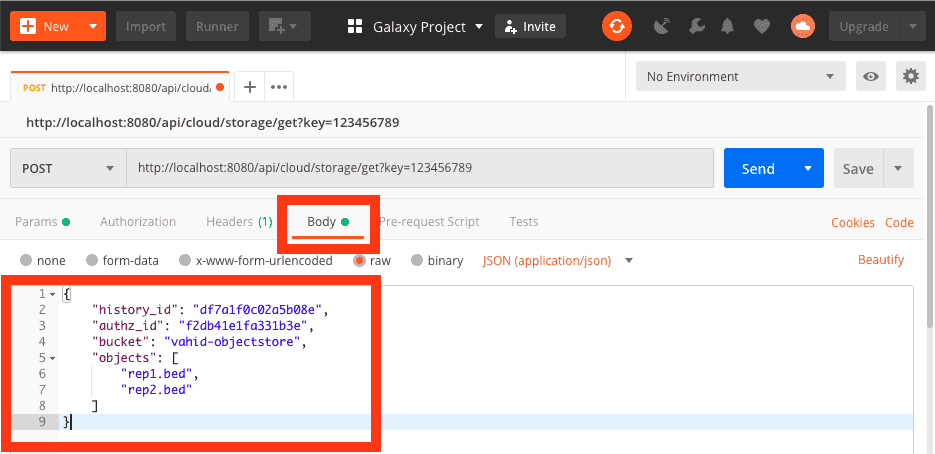
{
    "history_id": "df7a1f0c02a5b08e",
    "authz_id": "f2db41e1fa331b3e",
    "bucket": "vahid-objectstore",
    "objects": [
        "rep1.bed",
        "rep2.bed"
    ]
}
Replace
vahid-objectstorewith a bucket name from which you want togetdata, and replace["rep1.bed", "rep2.bed"]with the list of objects you want to copy to Galaxy from thebucket.4.6. Click on the
Sendbutton; Postman will submit a request to Galaxy togetdata and will shows a result as the following.[ { "update_time": "2018-12-07T22:41:39.844046", "uuid": "7d1a6d7d-6651-4cfe-8792-beb13a79949d", "deleted": false, "purged": false, "purgable": true, "total_size": 0, "state": "queued", "create_time": "2018-12-07T22:41:39.790590", "file_size": 0, "id": "5969b1f7201f12ae" }, { "update_time": "2018-12-07T22:41:40.058628", "uuid": "195e1cee-326c-4f88-bbf5-63a51bdc51bf", "deleted": false, "purged": false, "purgable": true, "total_size": 0, "state": "queued", "create_time": "2018-12-07T22:41:40.005482", "file_size": 0, "id": "df7a1f0c02a5b08e" } ]This JSON object shows two Galaxy datasets created for
rep1.bedandrep2.bed.